

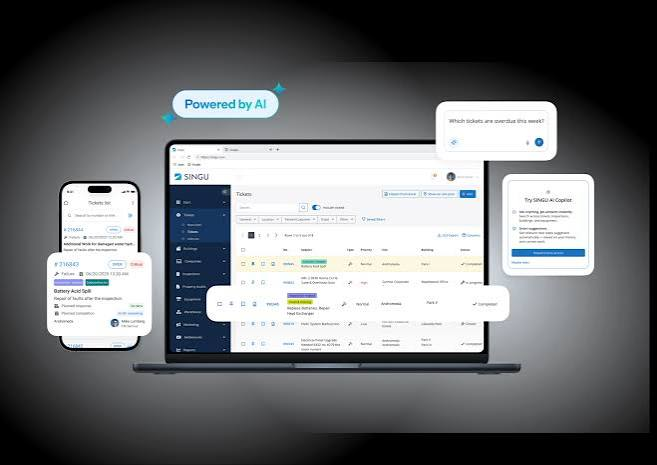
Selecting a software platform for facility maintenance is not a decision that should be made based on a product demo alone. For operations managers, facilities directors, and procurement leads responsible for keeping buildings, equipment, and service systems running reliably, the wrong choice carries real consequences — increased downtime, compliance gaps, wasted labor hours, and a fragmented paper trail that becomes difficult to defend during audits or incident reviews.
The maintenance software market has matured considerably, but not every product has kept pace with the operational complexity that most facilities teams face today. Some platforms look capable on the surface but lack the depth needed to support multi-site operations, regulatory documentation, or real-time asset tracking. Others are built for small-scale use and struggle when teams scale up or when the pace of work intensifies.
Before any contract is signed, it is worth working through a structured evaluation that goes beyond user interface and price point. The features covered here represent the operational baseline that any credible platform should meet — not as optional add-ons, but as core functionality that supports how maintenance work actually gets done.
1. Work Order Management That Reflects Real Workflow
Work order management is the operational center of any maintenance program, and the way a platform handles it reveals a great deal about how it was designed. Effective facility maintenance software should allow teams to create, assign, prioritize, and close work orders without requiring manual workarounds or off-system documentation. The process needs to mirror how work is actually dispatched — not an idealized version of it.
Platforms that handle this well make it easy to capture the origin of a request, whether it comes from a scheduled inspection, a reactive report, or a service escalation. They allow supervisors to assign tasks based on skill, availability, or geography, and they give technicians a clear view of what is expected before they arrive on site.
Traceability and Closure Documentation
A work order that closes without documentation is a liability. Maintenance teams often need to demonstrate that work was completed to a specific standard, especially in regulated industries or where equipment failures carry safety implications. A well-built platform captures completion notes, parts used, time spent, and technician sign-off at the point of closure — not as optional fields, but as part of a structured process. This traceability becomes critical when patterns emerge, when warranties are disputed, or when an auditor asks for a record of corrective action.
2. Preventive Maintenance Scheduling With Flexible Triggers
Reactive maintenance is expensive and disruptive. Preventive maintenance scheduling reduces unplanned downtime by organizing tasks around time intervals, usage thresholds, or condition-based indicators. What separates a capable platform from a basic one is the flexibility of those triggers. Fixed calendar-based scheduling works for some assets but fails others — particularly those whose maintenance needs are tied to operational cycles rather than dates.
Calendar, Meter, and Condition-Based Scheduling
A platform that only supports date-based scheduling will force teams to either over-maintain or under-maintain assets that operate on variable cycles. Meter-based triggers allow maintenance to be scheduled based on actual usage, which is particularly relevant for equipment in manufacturing, logistics, or high-traffic facilities. Condition-based scheduling, tied to sensor data or inspection outcomes, allows maintenance to be triggered by what is actually happening with the asset rather than what was assumed during setup. The combination of all three gives facilities teams the flexibility to maintain assets appropriately without excessive resource allocation.
3. Asset Management and Equipment History
Every piece of equipment in a facility has a history — a record of what was done to it, when it failed, what parts were replaced, and how it has performed over time. Without a centralized asset register that preserves this history, maintenance decisions are made without context. Teams replace parts prematurely, miss recurring failure patterns, or cannot determine whether an asset has reached the end of its serviceable life.
Lifecycle Visibility and Decision Support
Asset history informs decisions that extend well beyond day-to-day maintenance. It supports capital planning by showing which assets are consuming disproportionate maintenance resources. It supports vendor negotiations by providing accurate service records. It also supports safety reviews, particularly for assets that are subject to inspection under standards maintained by bodies such as the Occupational Safety and Health Administration. A platform that stores this history in a structured, searchable format allows those decisions to be made with confidence rather than guesswork.
4. Inventory and Parts Management
Maintenance work stalls when the right parts are not available. Parts management within a maintenance platform is not just about tracking quantities — it involves understanding lead times, reorder thresholds, storage locations, and the relationship between parts and the assets they support. Teams that manage this manually or through disconnected spreadsheets frequently encounter delays that could have been avoided with real-time visibility into stock levels.
Reorder Automation and Usage Tracking
When a platform connects parts consumption to work orders, it becomes possible to see which components are being used most frequently, which assets are driving the highest parts expenditure, and where stockouts are most likely to occur. Automated reorder triggers, set at appropriate minimum thresholds, prevent the common scenario where a technician arrives on site with incomplete materials. This connection between parts data and maintenance activity is one of the clearest indicators of whether a platform was designed for operational use or primarily for administrative reporting.
5. Mobile Accessibility for Field Technicians
Maintenance work happens in mechanical rooms, on rooftops, in parking structures, and across multi-building campuses. A platform that requires a desktop computer to function places an unrealistic burden on technicians who are working in the field. Mobile access — through a purpose-built application or a responsive web interface — allows technicians to receive assignments, update work status, capture photos, and record completion details from the point of work.
Offline Functionality and Sync Reliability
Mobile access that depends entirely on a stable internet connection is unreliable in many real facility environments. Basements, server rooms, and industrial areas frequently have poor connectivity. A platform that supports offline functionality — allowing technicians to work without a connection and sync data once connectivity is restored — is meaningfully more reliable than one that requires constant network access. This distinction matters during audits and compliance reviews, where gaps in documentation records can raise questions regardless of whether the cause was technical.
6. Reporting and Analytics That Support Decisions
Data collected by a maintenance platform is only useful if it can be retrieved and interpreted in a format that supports management decisions. Reporting tools vary considerably in their usefulness — some platforms produce standard reports that cannot be customized, while others offer configurable dashboards that allow teams to track the metrics that matter most to their operation.
Maintenance KPIs and Trend Identification
The most operationally relevant reporting capabilities focus on metrics such as mean time between failures, planned versus reactive maintenance ratios, technician utilization, and cost per asset. These indicators help managers identify where resources are being consumed inefficiently and where maintenance programs need to be adjusted. A platform that surfaces this information clearly, without requiring custom exports or manual data manipulation, gives facilities teams a meaningful operational advantage.
7. Compliance and Documentation Management
Many facilities operate under regulatory requirements that mandate specific inspection intervals, documentation practices, and corrective action timelines. A maintenance platform that does not account for this forces teams to maintain parallel documentation systems, which increases the risk of error and creates inconsistencies that can become problems during audits or incident investigations.
Audit Trails and Certification Tracking
Compliance documentation should be generated as a natural byproduct of maintenance activity, not as a separate administrative task. Platforms that embed compliance requirements into work order templates, inspection checklists, and completion workflows make it easier for teams to meet regulatory obligations without additional effort. Certification tracking for technicians, equipment, and facilities adds a further layer of assurance, particularly in environments where credentialed personnel are required to perform specific types of work.
8. Multi-Site and Multi-Team Support
Organizations that manage more than one facility location need a platform that can operate across sites without losing the ability to view performance at the portfolio level. A system that works well for a single building but cannot aggregate data across locations forces managers to consolidate information manually, which is time-consuming and prone to error.
Role-Based Access and Regional Configuration
Multi-site support is not simply a matter of adding locations to a database. It requires role-based access controls that allow site-level staff to manage their own operations while giving regional managers and corporate stakeholders appropriate visibility. Configuration options at the site level — including local asset registers, regional inventory pools, and site-specific compliance requirements — allow the platform to reflect the actual structure of the organization rather than forcing the organization to adapt to the platform’s assumptions.
9. Integration With Existing Systems
Most facilities teams already use a range of software tools — finance systems, HR platforms, building automation systems, and procurement tools. A maintenance platform that cannot exchange data with these systems creates information silos that slow down decision-making and increase the administrative burden on operations staff. Integration capability is not a premium feature — it is a basic requirement for any platform operating within an existing technology environment.
API Availability and Data Portability
The ability to connect via a documented API gives organizations the flexibility to build integrations as their needs change over time. Data portability — the ability to export records in standard formats — is equally important. It ensures that historical data remains accessible if the platform is eventually replaced and prevents vendor lock-in situations where switching costs become prohibitive because records are trapped in a proprietary format.
10. Vendor Support and Implementation Structure
A platform that is well-designed but poorly supported will fail in practice. The implementation period — when the platform is being configured, data is being migrated, and staff are being trained — is when many maintenance software deployments encounter their most significant difficulties. Vendors that provide structured implementation plans, dedicated support contacts, and accessible training resources give their customers a meaningfully better chance of successful adoption.
Long-Term Support Commitments
Beyond initial implementation, ongoing support quality determines whether teams are able to use the platform effectively as their needs evolve. Support responsiveness, update cadence, and the availability of user training materials all contribute to the long-term value of the investment. Before signing a contract, it is worth asking specifically about support structures, escalation paths, and how the vendor handles requests for configuration changes or additional training after go-live.
Closing Thoughts: What This Evaluation Protects
Facilities maintenance is not a function that benefits from experimentation. The assets, systems, and personnel that depend on it require consistency, reliability, and clear accountability. Choosing a software platform is a decision that shapes how those requirements are met — or missed — for years after the contract is signed.
The ten features outlined here represent the operational foundation that any serious platform should provide. Some vendors will present these as standard, and they genuinely deliver on them. Others will describe them in broad terms during the sales process without the depth of implementation that makes them useful in practice. The evaluation process — asking specific questions, requesting documented examples, and speaking with existing customers in comparable environments — is the only reliable way to distinguish between the two.
Taking the time to conduct that evaluation before committing protects the organization from the much larger cost of replacing a platform that was never the right fit to begin with.
